Notes Online: A Free Online Notebook With No Sign-Up
Take notes online without an account. Keep as many online notes as you need in one browser-based notebook, each with its own title in the sidebar, and pick up exactly where you left off next time you open the tab. Your notes stay on your device.
Everything You Need to Take Notes Online
A focused note-taking workspace built around the things that actually matter: saving notes, organising them, and getting back to them fast.
Save Multiple Notes
Keep as many notes as you need side by side. Each note is saved automatically as you type, no save button to remember.
Organise in a Sidebar
Browse all your notes from a clean sidebar, give each one a title, and rearrange them so the notes you use most stay at the top.
Quick Access & Search
Bookmark the page and your notes open in a single click. Full-text search jumps you to the right note without scrolling.
Dark Mode
A comfortable dark theme for late nights, plus light and auto modes that follow your system preference.
Private by Default
Notes are stored only in your browser's local storage. Nothing is uploaded, nothing is shared, no account exists to be hacked.
Export When You Need It
Download any note as a plain text (.txt) or Markdown (.md) file to back it up or move it into another app.
Take Notes Online in Three Steps
Going from blank page to organised notes online takes about ten seconds.
Open the editor
Visit onlinenotepad.net/app in any modern browser. There is no install step and no account to create.
Add and title your notes
Click "New Note" to add a note, give it a title, and start typing. Repeat for as many notes as you want, all kept in the sidebar.
Come back anytime
Your notes are saved automatically. The next time you open the page in the same browser, every note is right where you left it.
Why Take Notes Online?
Online notes go wherever a browser goes. A laptop at work, a tablet on the sofa, a borrowed computer in a hotel lobby: the same notes are one bookmark away. Nothing to install, no licence to manage, no version of the app to keep up to date.
Taking notes online also removes the friction that desktop apps add. There is no project file to create before you can write, no folder to choose, no autosave dialog to dismiss. Open a tab, type, and the note is already saved. When you need to find something later, full-text search across all your notes is faster than digging through folders.
And because OnlineNotepad.net stores notes in your browser rather than on a server, your content stays private without any extra configuration. There is no account that can be compromised, no cloud sync to misconfigure, and no provider with access to what you write.
An Online Notebook Without an Account
Most people looking for an online notebook want the same thing a notepad cannot give them: room for more than one page. That is the difference here. A notepad holds a single block of text; this online notebook holds a stack of them. Each note is a titled page in the sidebar, the whole set is searchable at once, and the notebook reopens on whichever page you were last writing in.
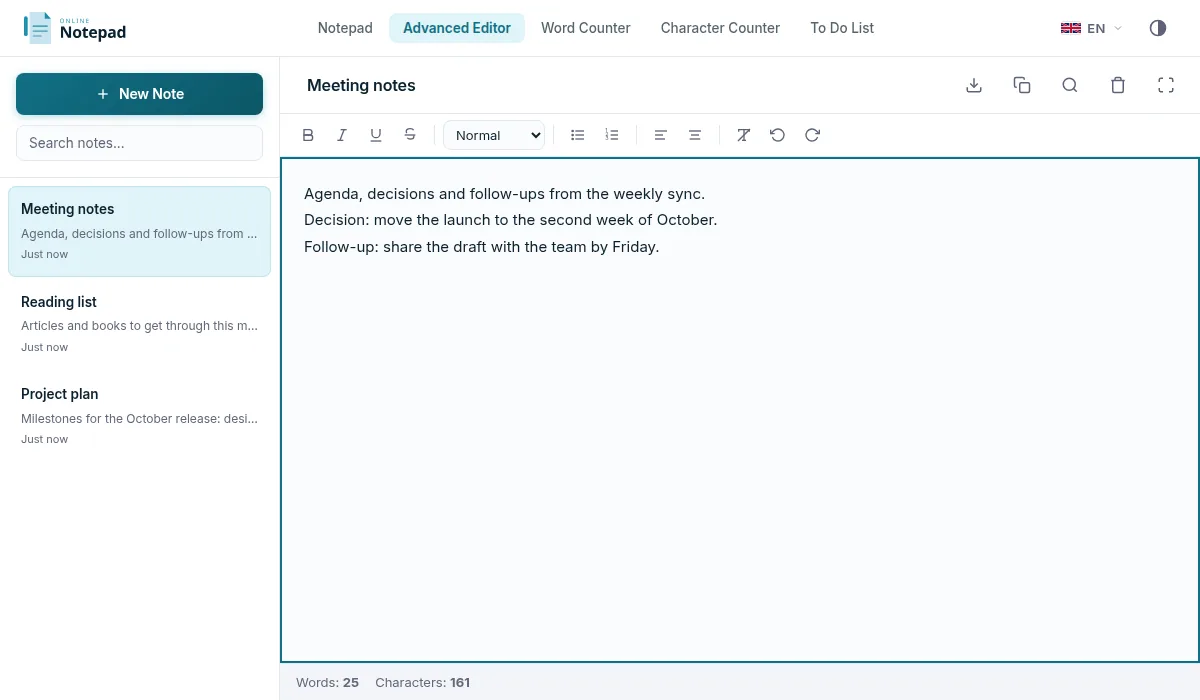
What separates it from a hosted notebook is where those pages live. A cloud notebook keeps them on a server behind an account you have to create, verify, and remember a password for. This online notebook keeps them in your browser's local storage, on the device in front of you, from the first keystroke. There is no sign-up step between opening the tab and writing.
The trade-off is worth stating plainly, because it is the only one: a local notebook does not follow you between devices, and clearing your browser's site data clears it. That is why every page can be exported as plain text or Markdown, and why the notebook is best suited to working notes rather than an archive you never back up. In exchange, nothing you write is transmitted, indexed, profiled, or held by anyone else.
What you can keep in it
A notebook with titled pages and instant search handles the everyday cases well: one page per meeting, a running page per project, a page of commands you keep forgetting, a draft you do not want sitting in an email client. Because pages cost nothing to create, there is no reason to cram unrelated notes together the way a single scratchpad forces you to.
Online Notes vs Cloud Note Apps
Apps like Notion, Evernote, and Google Keep are powerful, but the cost is complexity: sign-up flows, workspaces, sync settings, mobile apps, and an account that holds every note you have ever written. For most quick capture, that is more machinery than the task needs.
Taking notes online in the browser keeps the useful parts (autosave, multiple notes, search, dark mode) and drops the rest. Everything below is included for free, with no account:
- Multiple notes in a sidebar, so a meeting note, a shopping list, and a draft email can live next to each other.
- Rich text formatting when you need headings, bold, lists, or links, and a plain-text mode when you do not.
- Full-text search that finds words across every note you have saved.
- Markdown and plain-text export so your notes are never trapped inside the app.
- Works offline after the first load, thanks to a service worker that caches the editor.
- Local-only storage, meaning nothing leaves your device and nobody (including us) can read your notes.
If you only need a single scratchpad rather than a notes library, the simple online notepad covers that case with the same private, local-only approach, and works well as an online text editor, a single-page browser notepad online, for quick notes online, or as an online clipboard. When you want more than one note, this free online notepad works as a full notebook online, keeping every note in the same private workspace.
Good Uses for Online Notes
Meeting notes
One note per meeting, titled by date and topic. Search later by attendee name or project.
Project planning
Keep a running note per project for ideas, links, decisions, and follow-ups, separate from your task list.
Drafts and emails
Draft long messages in a calm editor before pasting them into Gmail, Slack, or LinkedIn.
Research and clippings
Paste quotes, URLs, and notes from articles into themed notes you can search across later.
Code snippets
Keep a note of commands and snippets you reuse, organised by language or tool.
Journaling
One note per day or one note per topic, with no cloud copy and no account attached.
Frequently Asked Questions
How do I take notes online for free?
Open onlinenotepad.net/app in any browser and start typing. There is no sign-up, no install, and no payment. Each note is saved automatically in your browser's local storage, and you can add as many notes as you want from the sidebar.
Can I save multiple notes online?
Yes. The Advanced Editor lets you create as many notes as you like. Each note appears in a sidebar with its own title, and switching between them is instant. Every note is autosaved as you type.
Is this an online notebook as well as a notepad?
Yes. A notepad holds one piece of text; an online notebook holds many. The editor at /app/ is the notebook: every note is a titled page in the sidebar, all of them searchable, all autosaved. If you only ever need one page, the simple notepad is the lighter option.
Where are my online notes stored?
Notes are stored in your browser's local storage on the device you are using. They are not uploaded to any server. If you open the same browser on the same device, your notes will be there. If you switch browsers, devices, or clear site data, you will start with a fresh notebook.
Do my online notes sync between devices?
No, and that is the deliberate trade-off for having no account. Your notebook lives in one browser on one device, because nothing is sent to a server. To move notes to another device, export them as .txt or .md and open them there.
Do I need an account to take notes online?
No. OnlineNotepad.net never asks for an email or password. You can take notes online immediately without registering, and we have nothing to lose if our database is breached because we do not store your notes.
Can I take notes online without internet?
Yes. After the first time you load the editor, a service worker caches it so the page works offline. You can keep adding and editing notes on a plane or in any other offline situation, and changes are saved locally.
How do I organise my online notes?
Give each note a clear title in the sidebar (for example "Weekly review", "Trip packing list", or a project name). Use full-text search to find a note instantly, and rearrange the sidebar so frequently used notes are easy to reach.
Can I export my notes?
Yes. Any note can be downloaded as a plain text (.txt) file or as Markdown (.md), so you always have a portable copy and can move it into another app whenever you want.
What is the difference between this and a single online notepad?
The simple online notepad is a single page for one piece of text, ideal as a quick scratchpad. The notes-online experience at /app/ adds multiple notes, a sidebar with titles, rich text formatting, and full-text search, which makes it better when you want to keep more than one note long-term.
What is the best website for notes?
There is no single best one, because the right site depends on whether you want an account. If you want notes that follow you between devices and do not mind signing up, pick a hosted service. If you want to write immediately, keep everything on your own device, and never hand over an email address, pick a browser-based notepad: OnlineNotepad.net stores notes in your browser's local storage, autosaves as you type, and works offline after the first load. Judge any candidate on three things: how fast it opens, whether it autosaves without a button, and where your text actually ends up.
What is the best free notes app?
"Free" covers two different things, so check which one you are getting. Some free notes apps are free tiers of paid products, with limits on note count, device sync or export. Others, like this one, are free because there is no account and no server storing your notes, so there is nothing to meter. OnlineNotepad.net has no note limit, no paywalled export, and no upgrade prompt. The trade-off is that notes live in the browser you wrote them in, so download a copy of anything you need elsewhere: the Advanced Editor exports Markdown (.md), and the simple notepad exports plain text (.txt).
Start Taking Notes Online
Open a tab, write what you need, come back to it tomorrow. No account, no install, no cloud.